The HR platform for shift-based businesses

Rosters, time & people. Finally in one system.

EmployeeFy fills your roster in one click – fair, explained and checked against labour law. Plus time tracking, leave, qualifications and on-call duty – from the local restaurant to the corporate group.

  • Your own installation
  • GDPR-compliant
  • AT · DE · CH
  • Web + app
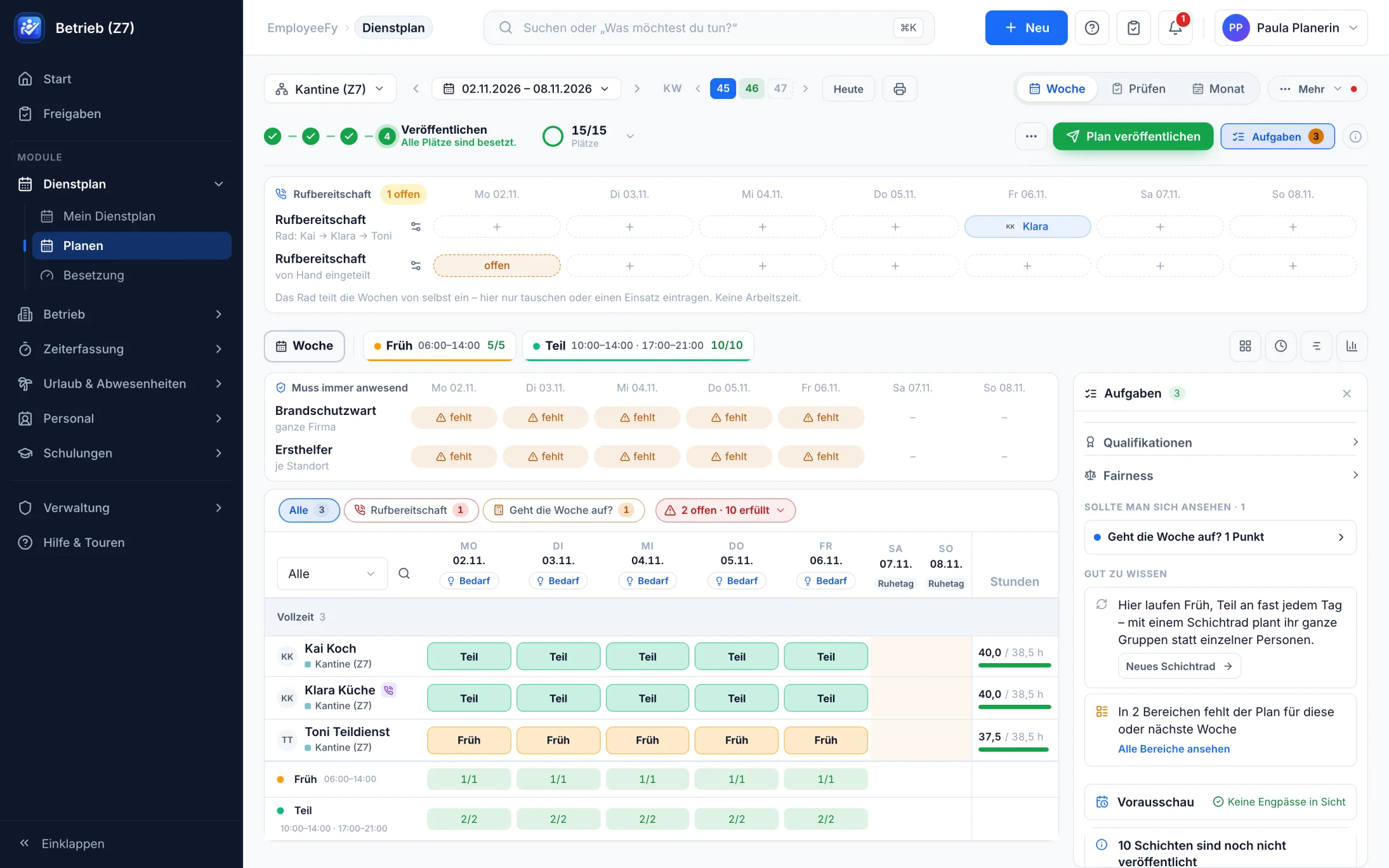
EmployeeFy weekly roster with shifts, mandatory roles, on-call duty and tasks
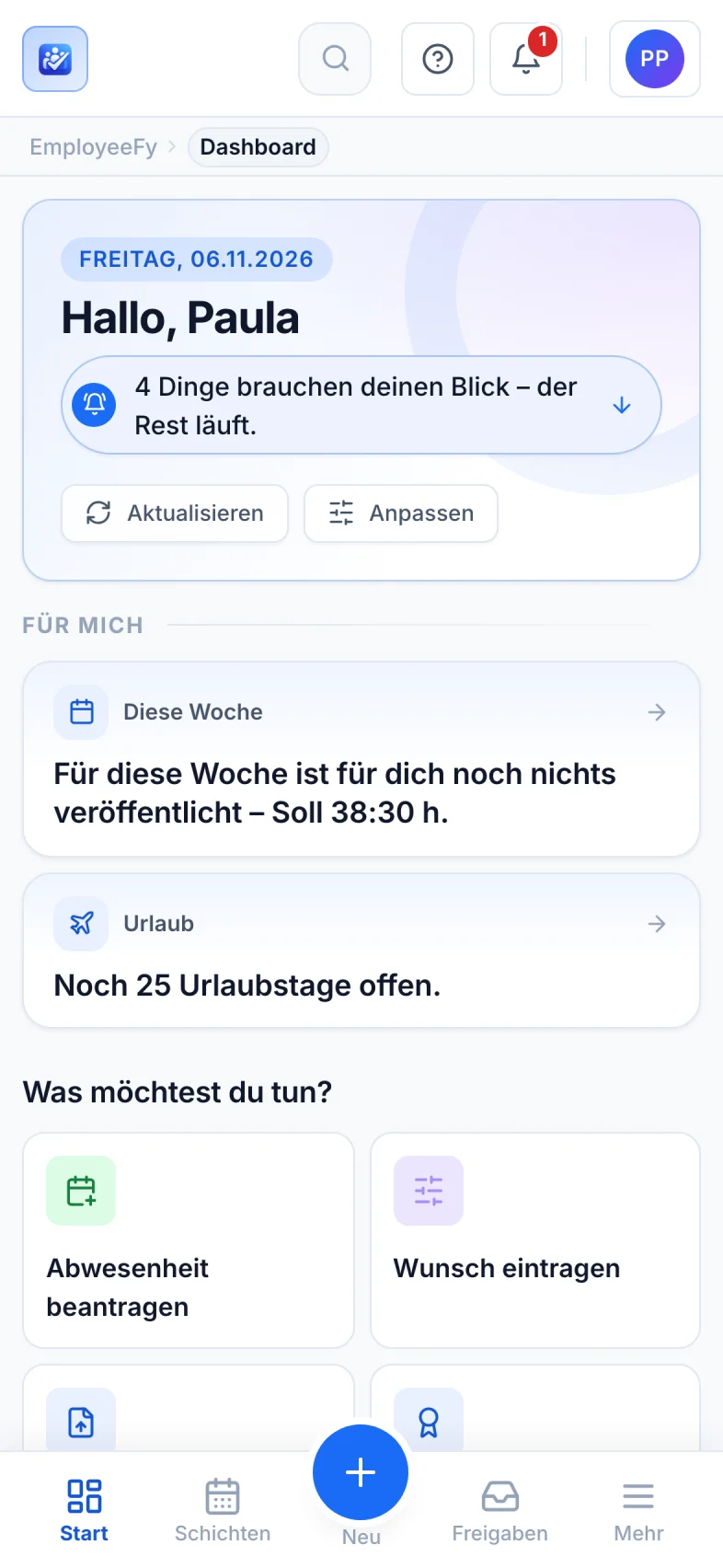
EmployeeFy on a smartphone: personal start page
15
steps in the setup assistant – guided, not complicated
100 %
your own installation – your data stays with you
~40 s
to import 2,000 people from existing lists
16000+
automated tests safeguard every new release

Fits into your landscape – export, devices and operations

DATEV, BMD, Excel, CSV, PDF, iOS, Android, Kiosk-Tablet, Docker, Podman, Let's Encrypt, S3, SFTP, NAS

Sound familiar?

No more spreadsheets, paper slips and group chats.

In many businesses the roster lives in a spreadsheet, leave on paper and shift swaps in a group chat. EmployeeFy brings it all together in one place – transparent for everyone.

  1. Piecing the roster together in Excel on Sunday night“Fill automatically” – the week is done in seconds, fairly distributed
  2. Working out rest periods and maximum hours in your headLabour law is checked on every assignment – as a warning or a hard stop
  3. Shift swaps over WhatsApp, nobody knows what appliesSwaps and take-overs in the app, confirmed by the manager
  4. Leave requests on paper, remaining days in a drawerRequest, approval, deputy and balance – all digital
  5. Expired forklift licences only noticed at the inspectionExpiry warning 60 days ahead and a notice right in the roster
  6. Typing up timesheets for payrollClock in via app or kiosk, approve, export – done

Product tour

This is what planning looks like when it thinks ahead.

Real views from EmployeeFy – no illustrations, no promises. Click through.

The weekly roster: everything on one screen

Shifts, people, contract hours, mandatory roles and on-call duty – in one view. The step bar at the top shows what to do next.

  • Staffing per shift and day at a glance
  • Contract hours per person as a bar
  • Task panel with everything still open
EmployeeFy weekly roster with shifts, mandatory roles, on-call duty and tasks

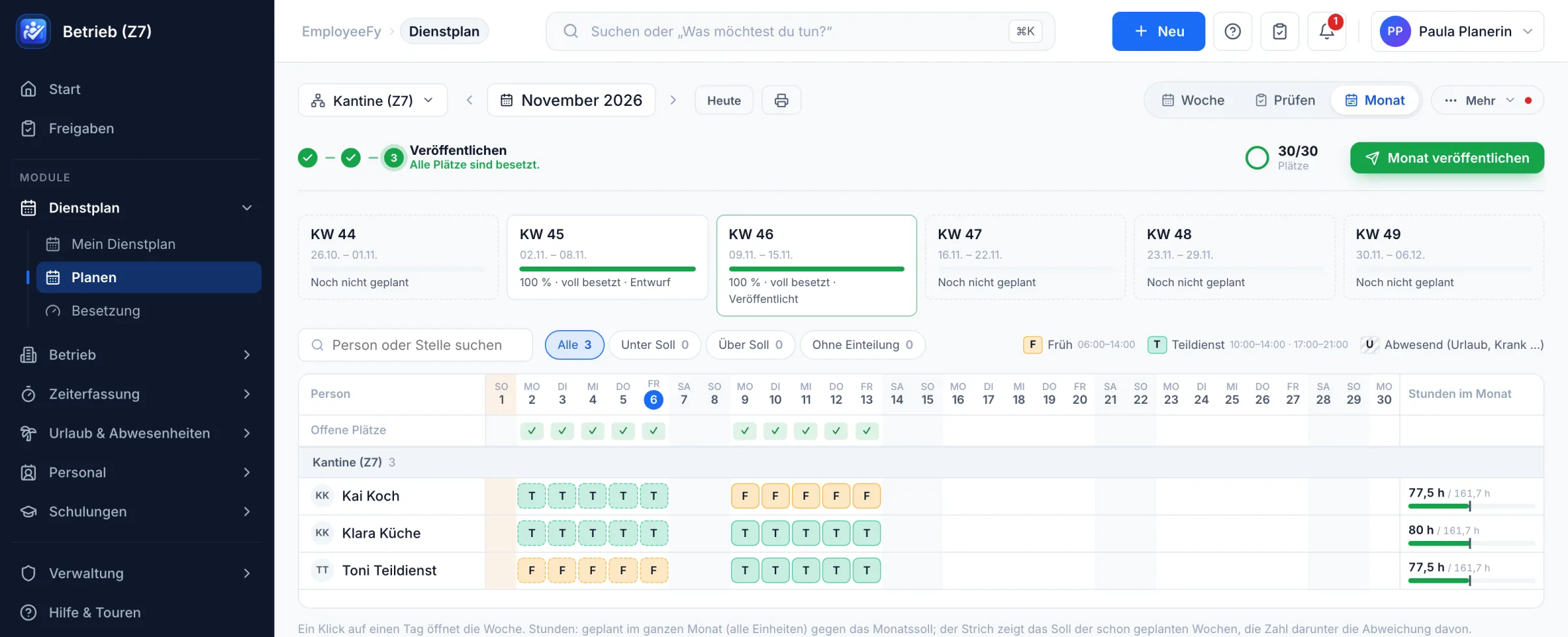
The whole month under control

All weeks side by side, with the status of each calendar week and monthly hours per person. One click on a day opens the week.

  • “Fully staffed · published” per week
  • Monthly hours against target for every person
  • Publish the whole month at once
EmployeeFy monthly roster with week status and hours per person

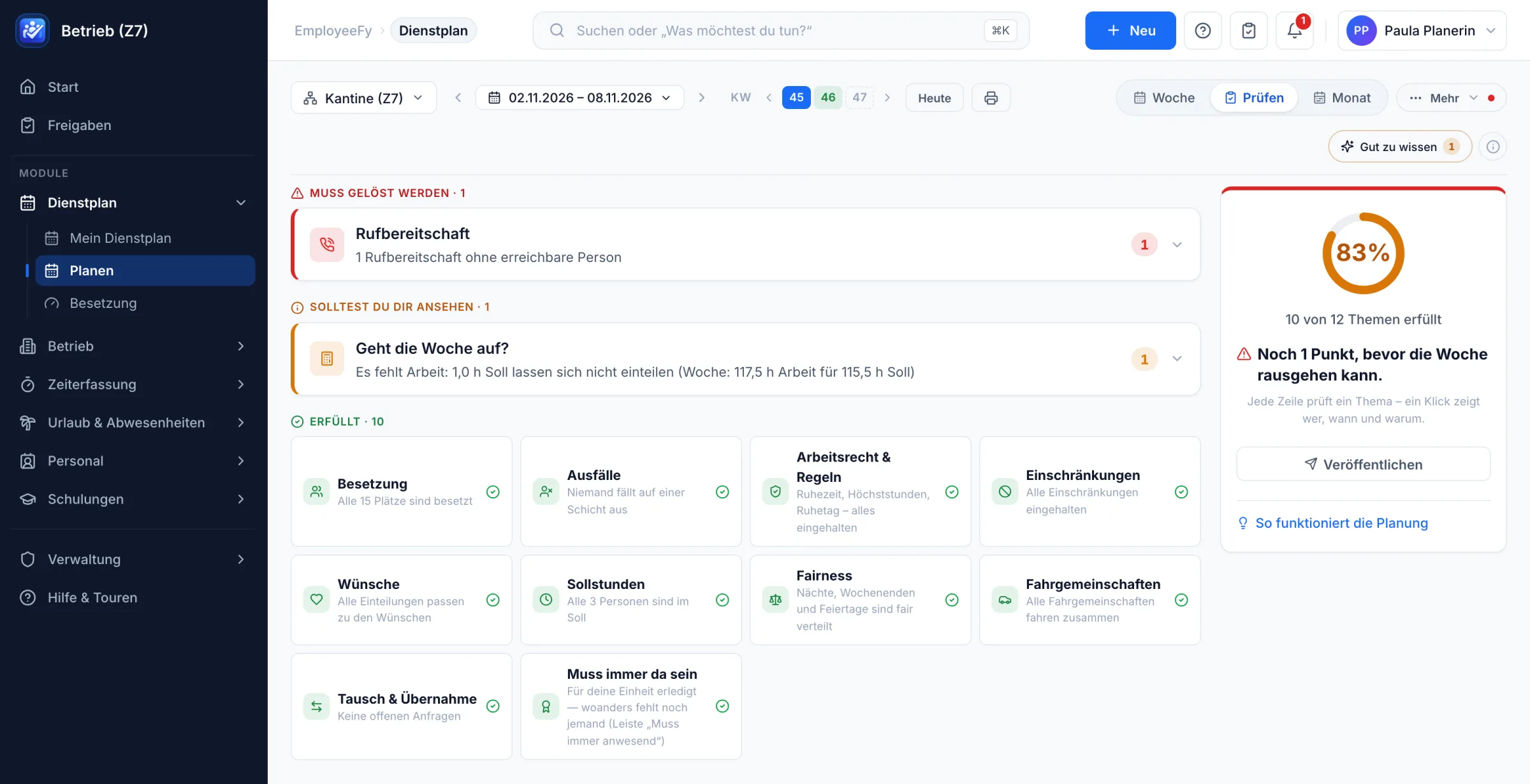
Check before the week goes out

Twelve topics are checked before publishing – from labour law and fairness to car pools. One click shows who, when and why.

  • “Must be resolved” and “worth a look” kept apart
  • A ring shows how much is already met
  • Publish straight from the check
EmployeeFy roster check: 10 of 12 topics met, including labour law, fairness and wishes

People in the right place

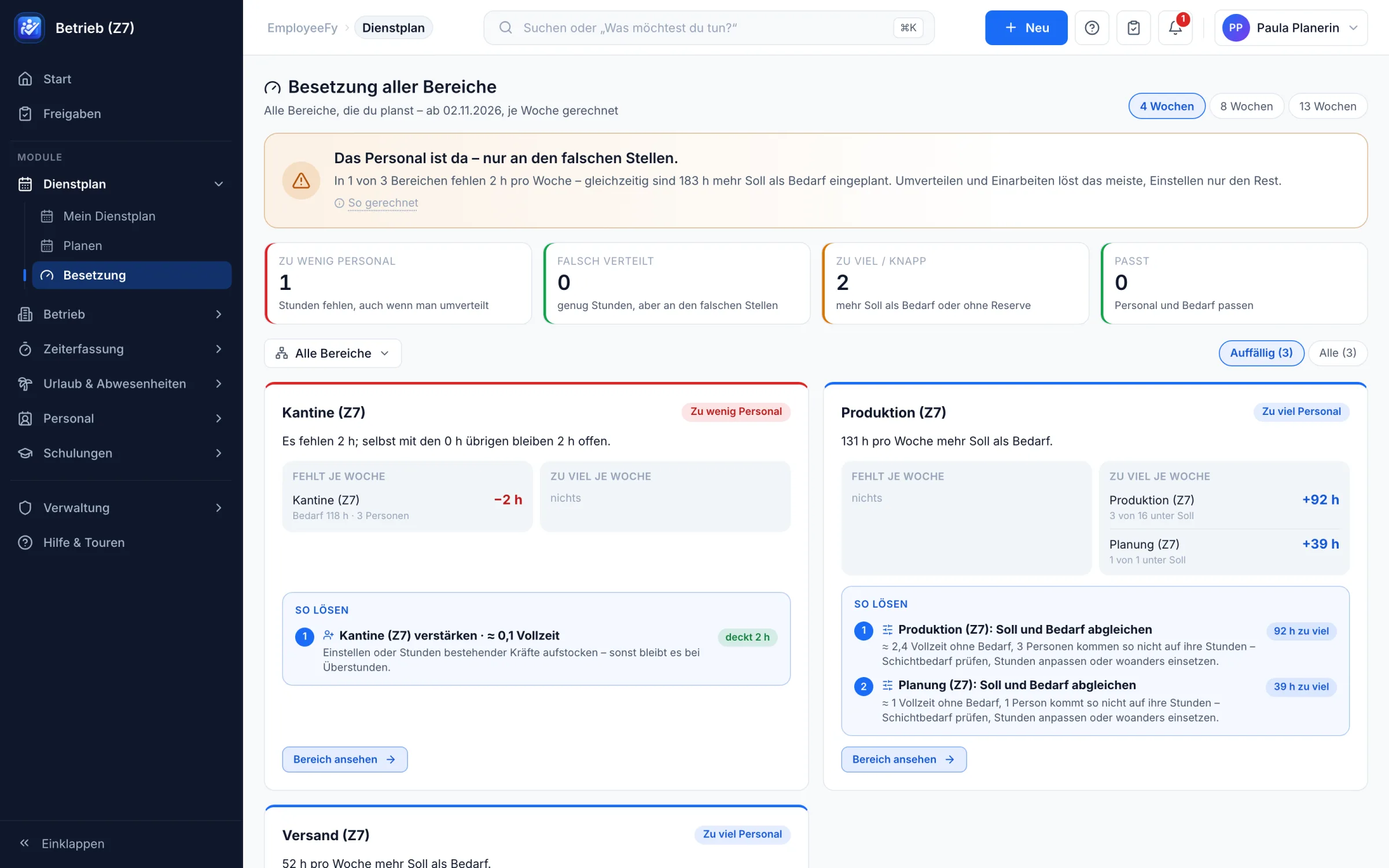
Across all teams and up to 13 weeks: where are people really missing, and where are they just in the wrong place? With concrete solutions instead of gut feeling.

  • Too few, misallocated, too many – clearly separated
  • Suggestions with hours and full-time equivalents
  • A basis for hiring and reallocation
EmployeeFy staffing overview across all teams with suggested solutions

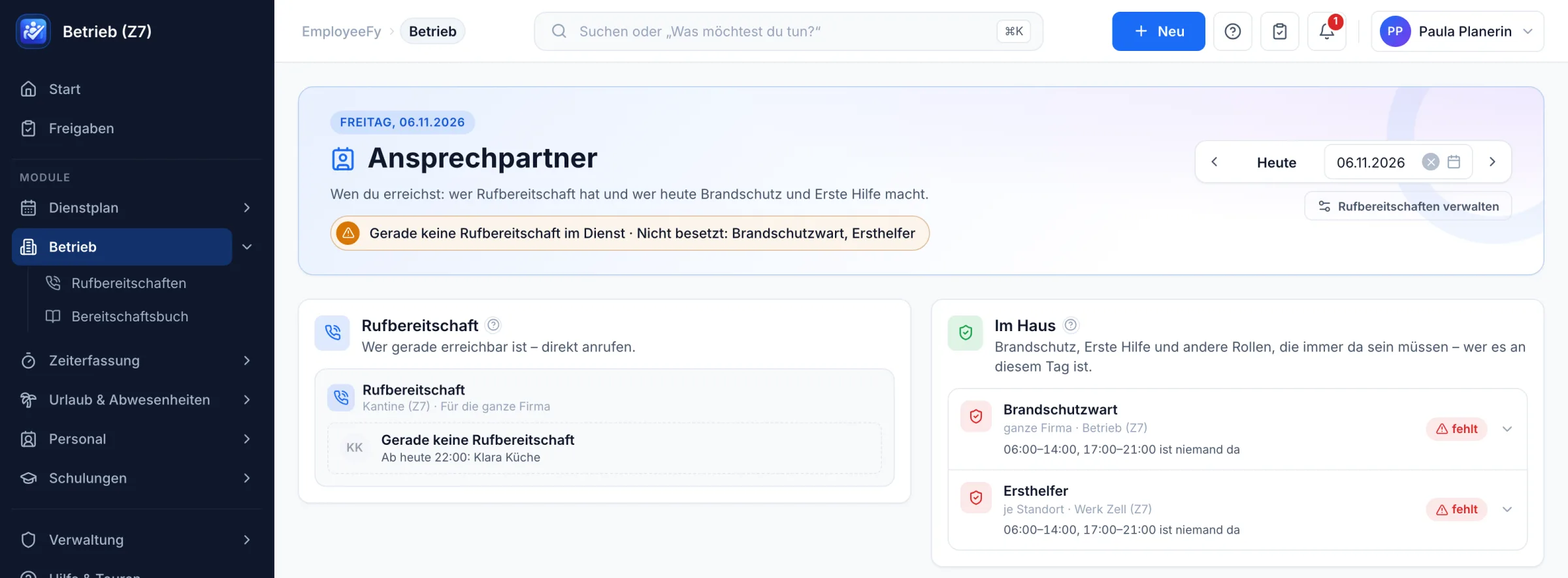
Who can be reached, who is on site?

On-call duty and mandatory roles such as fire safety and first aid for every day – with a warning as soon as someone is missing.

  • On-call duty with a call button
  • Gaps with exact times
  • Available for any day, past or future
EmployeeFy contacts: on-call duty and mandatory roles on site at a glance

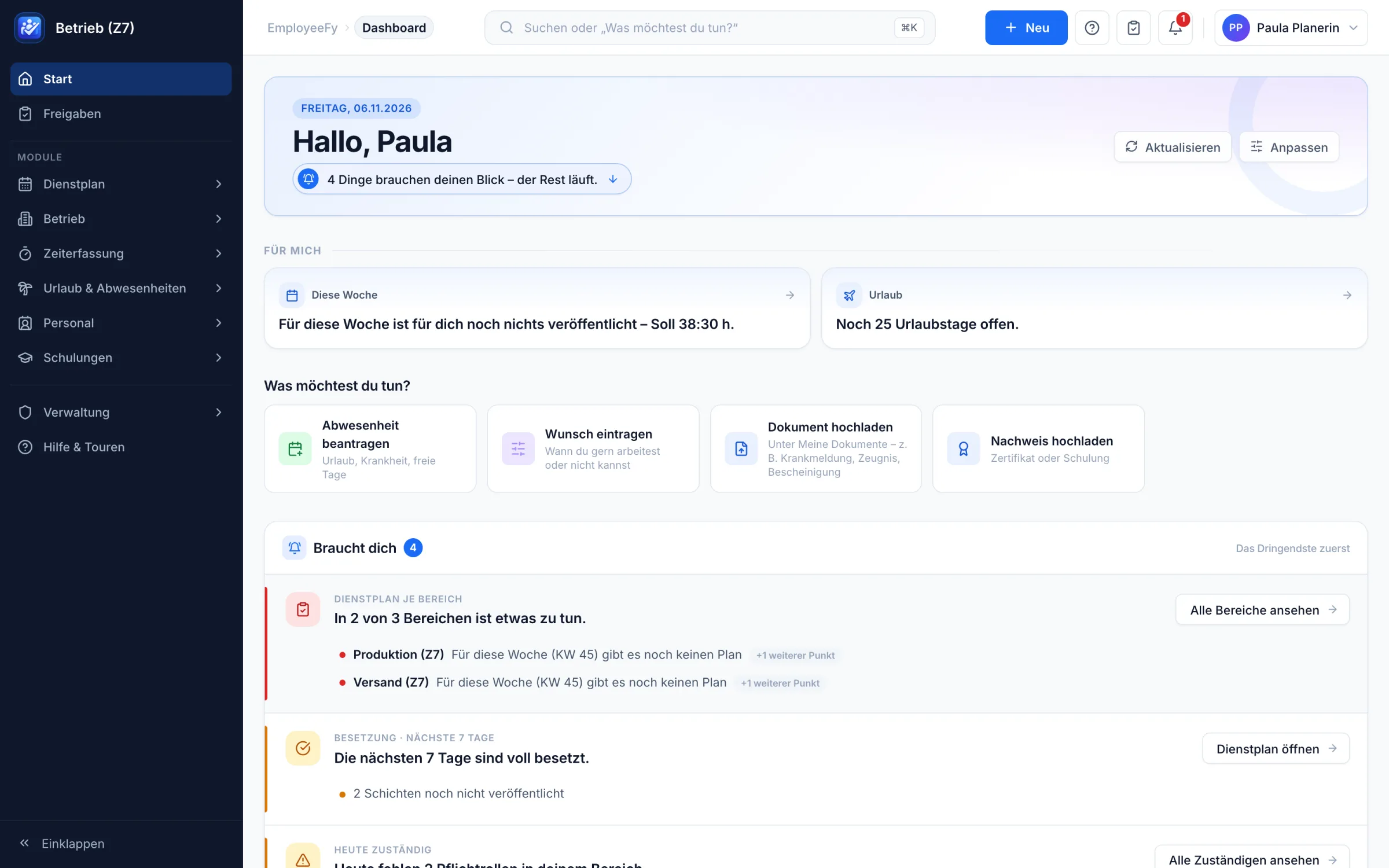
The start of the day

When signing in, everyone sees what concerns them – in full sentences instead of tables. The most urgent first.

  • “4 things need your attention – the rest is running.”
  • Quick actions: absence, wish, document, certificate
  • Adjustable per role and person
EmployeeFy dashboard with personal tasks and notices

One platform

One system for everything people-related.

All modules share the same data: people on leave aren't scheduled. People without a valid licence get flagged. People who are clocked in count as present.

Time tracking

One button to clock in. Every minute in the right account.

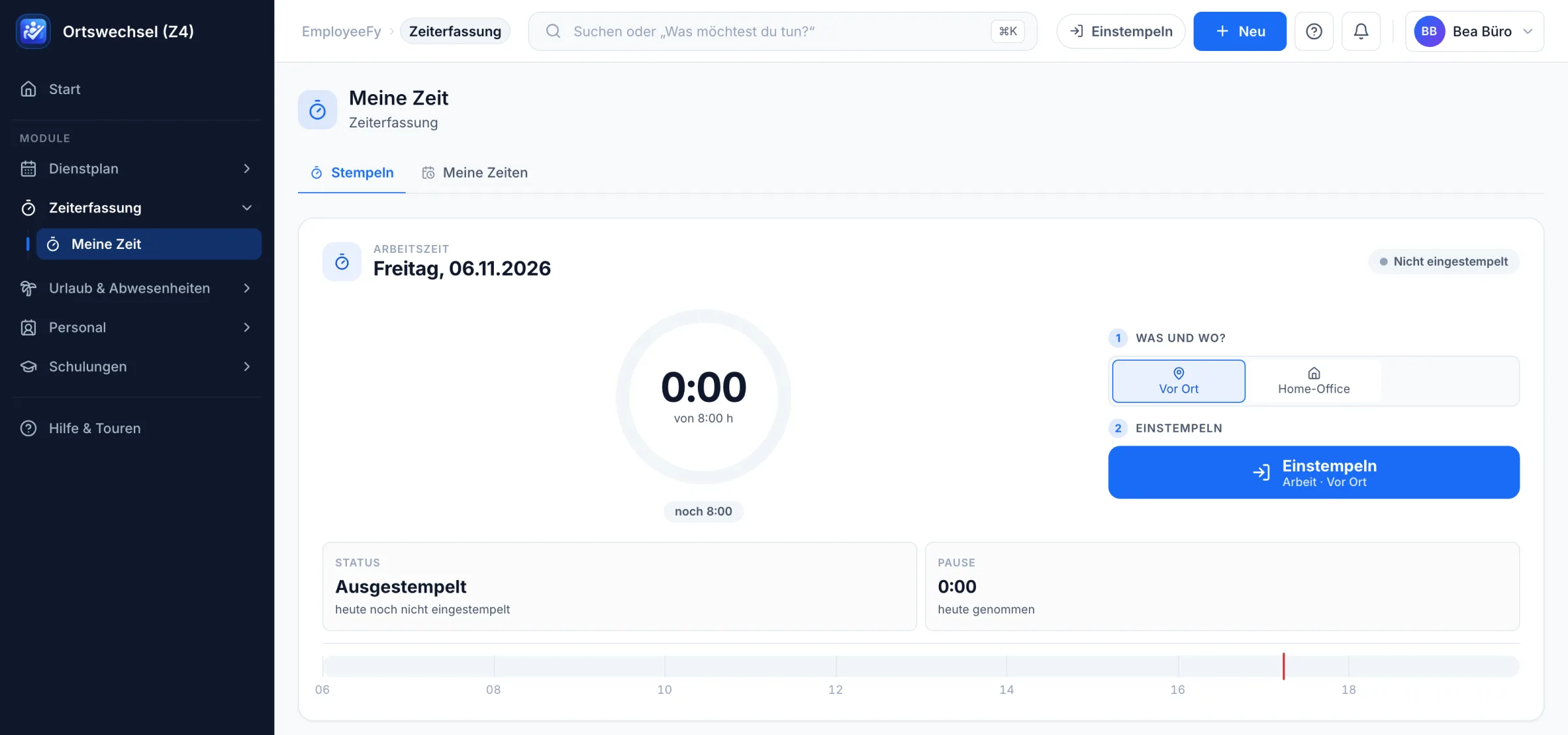
Employees choose where they work and clock in with one click – in the browser, in the app or at the kiosk tablet. The week shows each day as a timeline with breaks, status and balance.

  • “What and where?” – on site, home office or on the road, allowed per team
  • Daily timeline with breaks and progress towards target
  • Forgotten clock-outs are detected and can be corrected
  • Submit days – “submitted” and “approved” always visible
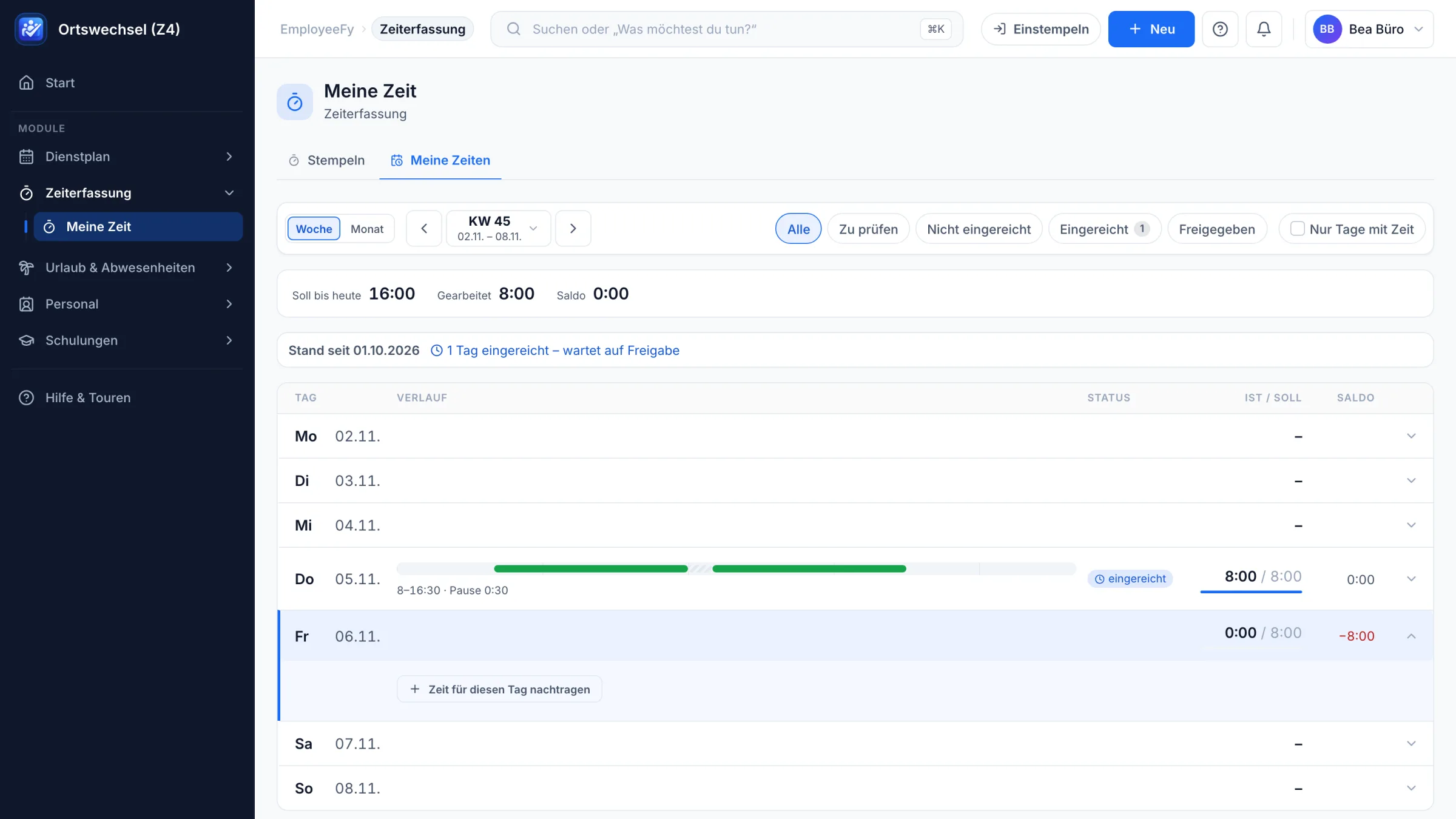
EmployeeFy My time: weekly overview with timeline, status and balance
EmployeeFy time clock with a choice of on site or home office
Approvals

Everything that needs a decision – in one place.

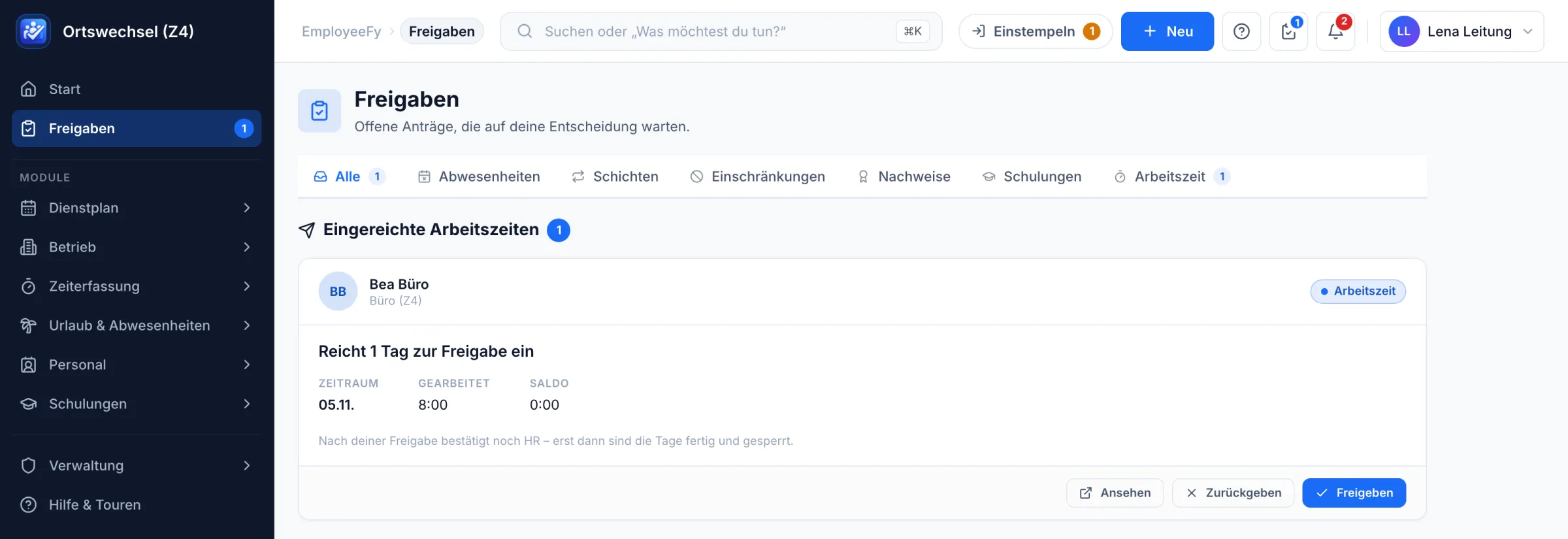
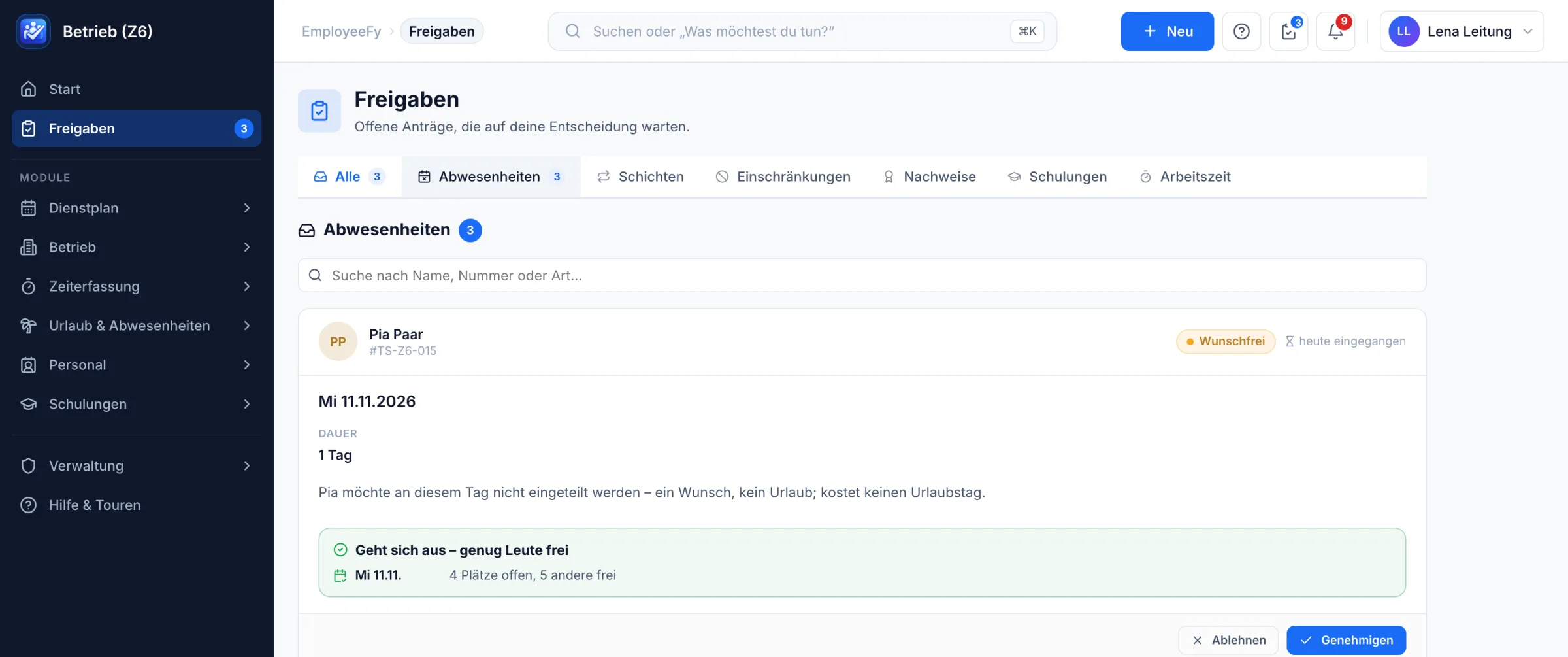
Leave, shift swaps, restrictions, certificates, training and working time land in one list. Every request shows what it's about and who decides next.

  • Six kinds of requests, one list with a counter
  • Working time in two steps: first the manager, then HR
  • Approve, return or view – right from the card
  • Deputies and escalation when the manager is away
EmployeeFy approvals: submitted working time with a note on the second approval by HR
EmployeeFy approval of a day-off wish with staffing check “Works out – enough people free”
Leave & absence

Who's away, who's back – and does it still work out?

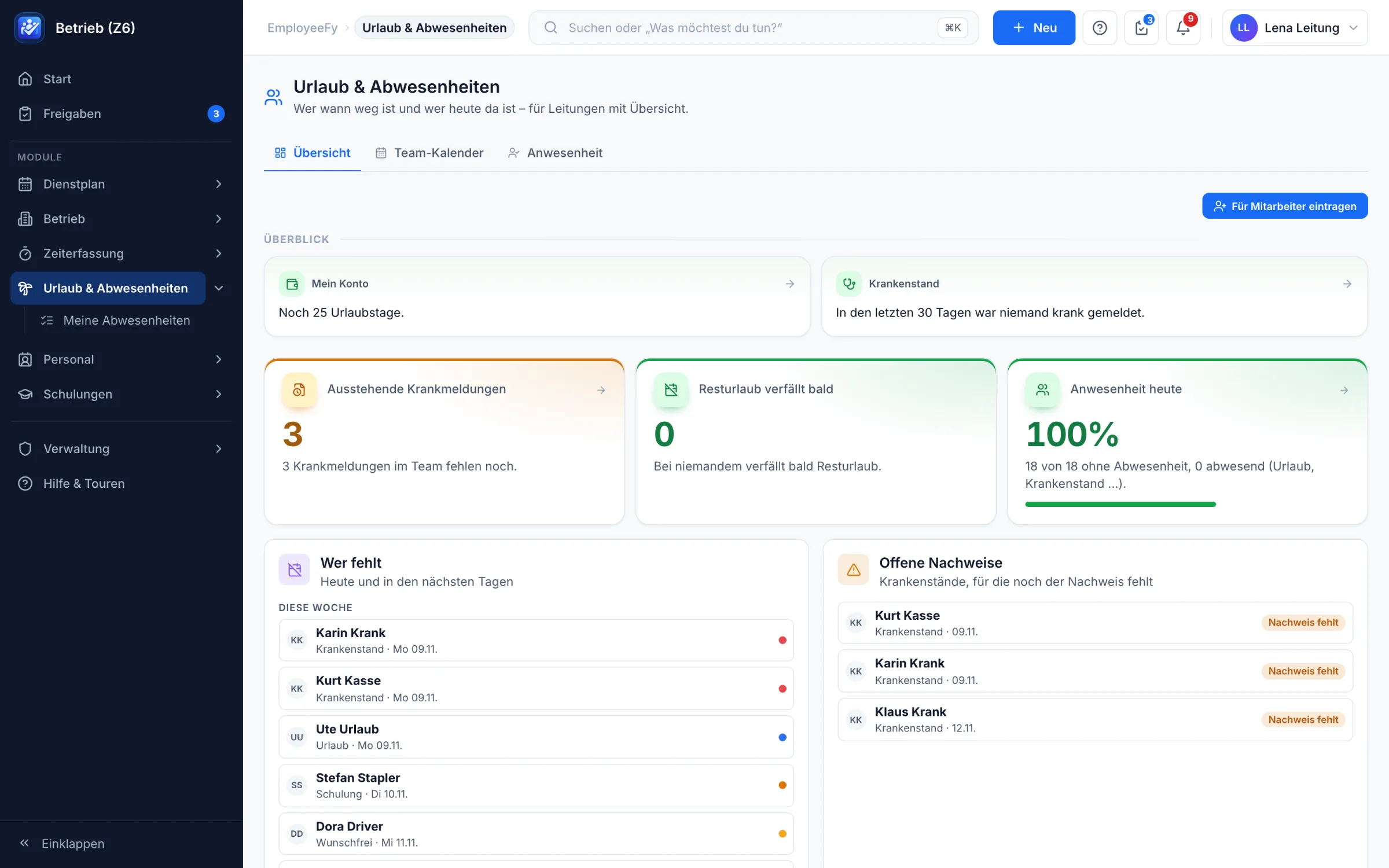
Leave, sick leave, training, day-off wishes and home office in one calendar. EmployeeFy checks staffing as soon as a request comes in – the manager decides with all the facts at a glance.

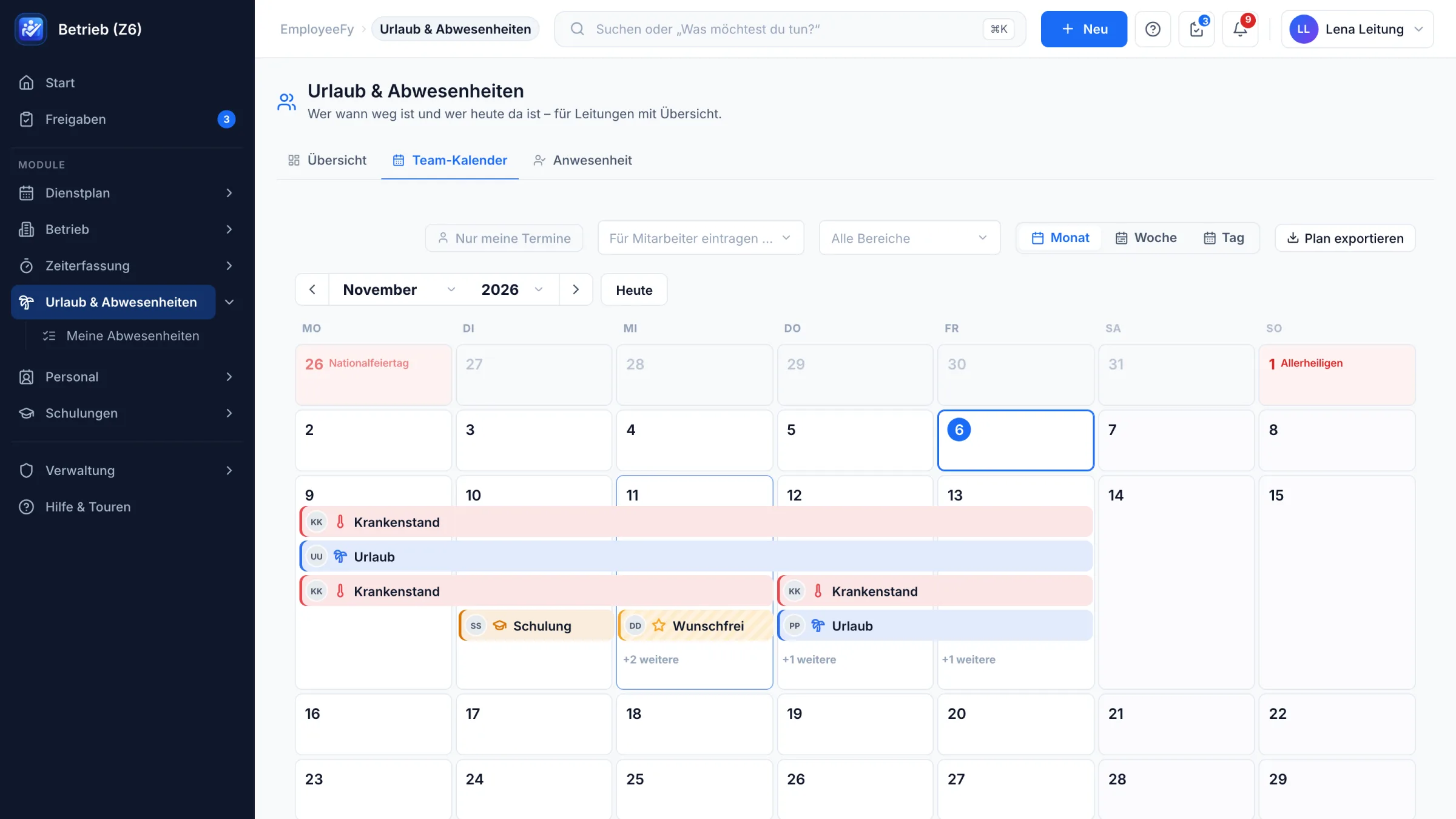
  • Team calendar by month, week or day – with regional public holidays
  • Staffing check on every request: “4 slots open, 5 others free”
  • Open sick notes and missing certificates collected automatically
  • Leave account with carry-over, expiry and pro-rata entitlement
  • Blackout periods and company holidays for company, site or team
EmployeeFy leave overview for managers: who is away, open sick notes, attendance today
EmployeeFy team calendar with sick leave, holidays, training and day-off wishes
Payroll export

From clock-in to payroll – no retyping.

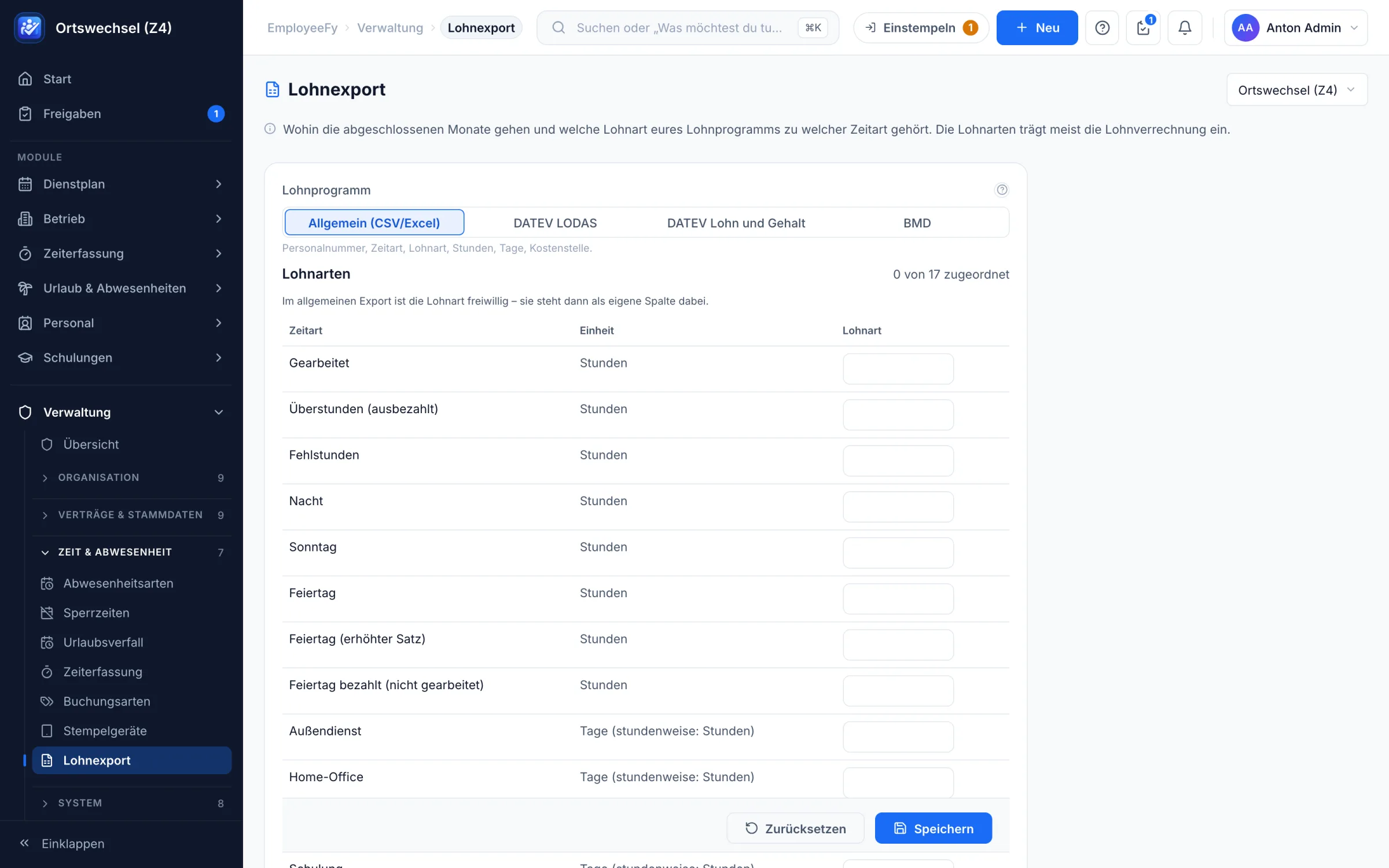
Closed months go straight to your payroll software. Define once which wage type belongs to which time type – done.

  • DATEV LODAS, DATEV Lohn und Gehalt, BMD or CSV/Excel
  • Time types such as night, Sunday, holiday and overtime kept apart
  • Month-end closing with lock – nobody quietly changes anything afterwards
  • Timesheet as a PDF to sign
EmployeeFy payroll export with CSV/Excel, DATEV and BMD
Employees & org chart

Who works where, who leads, who deputises?

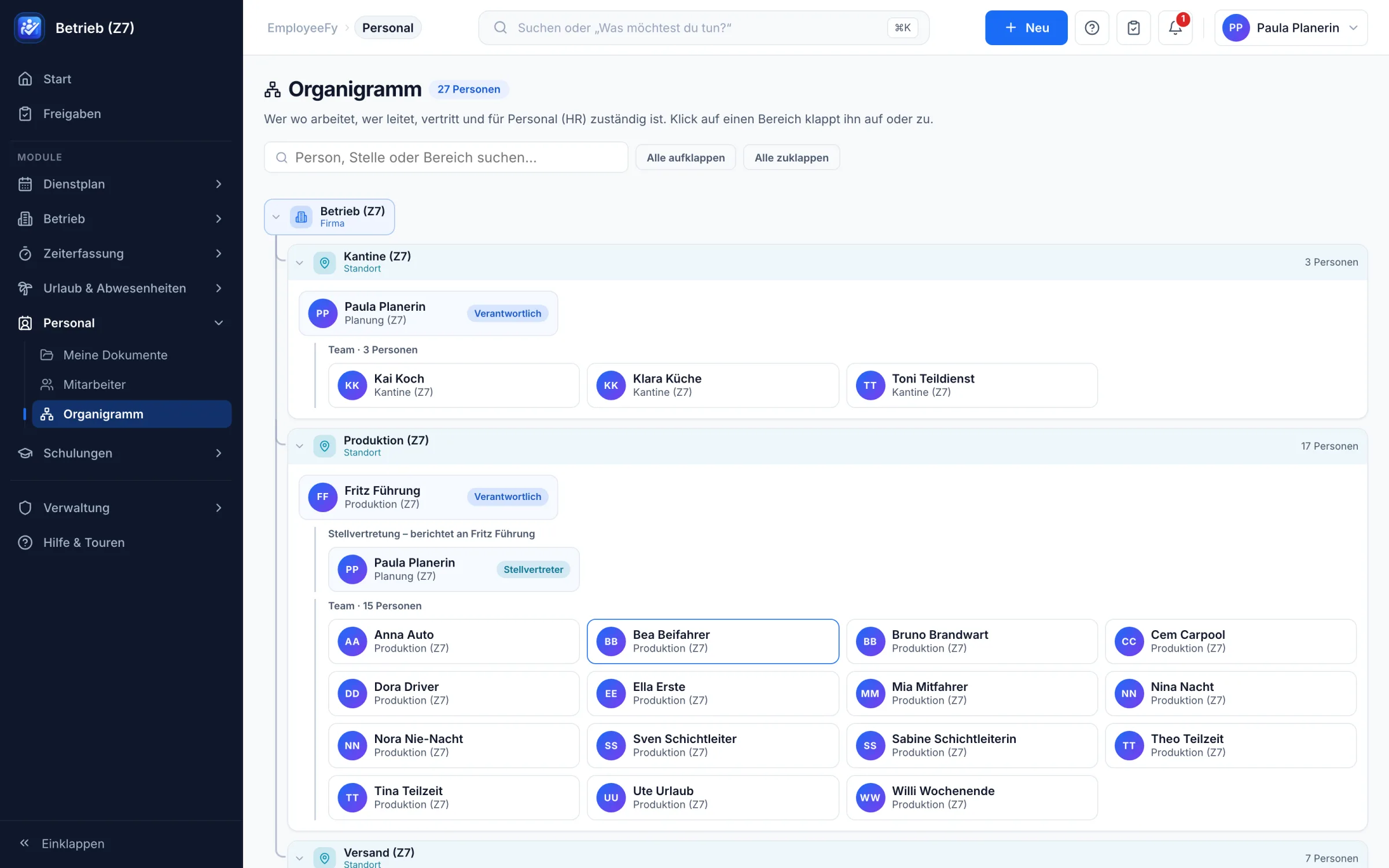
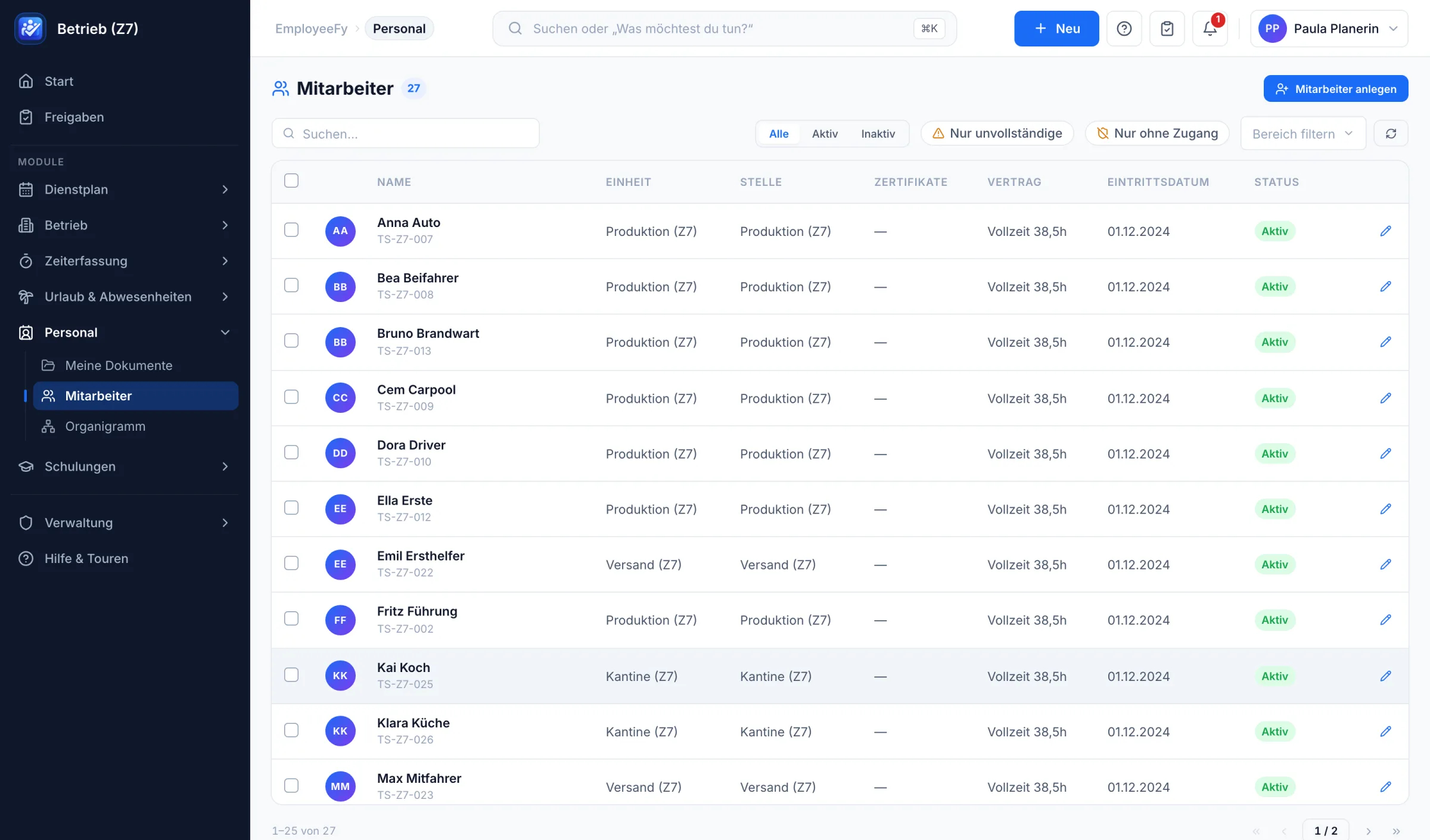
Personnel management knows each person's team, position, contract and start date. The org chart builds itself from that – with managers, deputies and teams.

  • Filters for incomplete data and people without access
  • Staff numbers generated automatically per company
  • Contracts, working time models and qualifications on the person
  • Documents per person – encrypted and separated by permissions
EmployeeFy org chart with managers, deputies and teams
EmployeeFy employee list with team, position, contract and status

Also included

Qualifications & training

Who has what, valid until when? Expiry warnings, mandatory training, sessions with waiting lists and multi-step cost approval.

On-call & mandatory roles

Rotation, swaps and an on-call log. Plus the answer to: are there enough first aiders and fire wardens on site right now?

Employees & documents

Personnel files, contracts, working time models, documents and org chart – stored encrypted and cleanly separated by permissions.

Dashboard

Every question answered in one sentence: Who's in today? What's waiting for me? Where is someone missing? Details on click.

Mobile app for your team

One app for everyone: clock in, see your own roster, keep an eye on your time account – light or dark. Connects to your server via QR code. The App Store launch is in preparation.

  • iOS
  • Android
  • Clock in
  • My roster

Roster

One click fills the week. You keep the final say.

Four steps from an empty week to a published roster. Every suggestion tells you why – and every decision can be overruled.

  1. 1

    Create the week

    Shift patterns, templates and demand per position become the week. Company holidays and public holidays are already included.

  2. 2

    Fill automatically

    Only people who fit without any warning are assigned – ranked by rotation, open hours, qualifications, wishes and fairness. Pick a focus: balanced, contract hours, wishes or fair nights.

  3. 3

    Check & resolve

    Every gap tells you why it's open (“nobody free: absent 4 · rest period 1”) – with a one-click fix. Your manual assignments stay untouched.

  4. 4

    Publish

    Your team gets the roster in the app. Later changes are marked; swaps and take-overs follow the same rules.

  • Shifts past midnight
  • Split shifts
  • 24-hour shifts
  • Partial assignments
  • Floaters from other teams
  • Car pools
  • Sick note with replacement suggestion
  • Printed roster for people without a phone

For every role

Everyone sees exactly what they need.

One system, four perspectives – and permissions that cleanly separate who may see and change what.

Management

Overview and compliance

  • Staffing of all teams across weeks
  • Labour law checked on every assignment
  • Data on your own installation
HR & payroll

Less paper, clean data

  • Leave, time off in lieu and expiry handled automatically
  • Second approval of hours, then export
  • Certificates and mandatory training in view
Team leads

The week in minutes, not hours

  • Fill automatically – with reasons
  • Sick leave, swaps and day-off wishes in one place
  • Only your own people – cleanly separated
Employees

Everything on the phone

  • Own roster, time account and leave
  • Clock in via app or kiosk
  • Wishes and swaps without a group chat

Labour law built in

Compliant rosters without studying the statute book.

Rest periods, maximum hours, averaging periods, weekly rest, night work and youth protection are checked on every assignment – including swaps and take-overs. You decide how strict each rule is.

  • OffThe rule isn't checked.
  • WarningThe planner sees a yellow bar and may overrule it with a reason.
  • BlockThe assignment is rejected – better safe than sorry.

ATDECHEUCountry presets in one click – adjustable per company, site or team.

Time tracking

Clock in, approve, pay. No timesheets.

On the phone, at the kiosk tablet by the entrance or working from home: every minute lands in the right account. The manager approves, HR confirms, the export goes to payroll.

  • Clock in via app or kiosk with PIN – works offline and syncs later
  • Home office and on-the-road allowed per team, with a notice or hidden
  • Live board “On site now” – without ever showing the reason for an absence
  • Two-step approval: first the manager, then HR
  • Month-end closing with lock and a timesheet PDF to sign
  • Export for DATEV, BMD, CSV and Excel

Unique

Who's in charge today? The answer is already there.

EmployeeFy checks every quarter of an hour whether enough first aiders and fire wardens are on site – across all shifts and teams. If someone is missing, it tells you who could step in.

  • Mandatory roles like first aiders: fixed (“always 1”) or scaling (“+1 per 20 present”)
  • On-call rotation: plans weeks ahead and skips people who are sick or on leave
  • Swap a day or a whole turn – right in the app, with approval
  • On-call log: call-outs with solution and screenshots, evaluation per person

The difference

Why not just Excel – or yet another tool?

Because rosters, time, qualifications and labour law belong together. Only when everything reads the same data can the system check what really matters.

Excel & paper Separate point solutions EmployeeFy
Fill the roster automatically – with reasonsNoPartlyYes
Check labour law on every assignmentNoPartlyYes
Qualifications checked right in the rosterNoNoYes
Mandatory roles every 15 minutes (first aid, fire safety)NoNoYes
Time tracking, leave & roster in one systemManualPartlyYes
Own installation instead of a shared cloudNoRarelyYes
App for all employeesNoPartlyYes

Up and running fast

Set up in hours – not weeks.

No consulting project, no empty forms. An assistant asks about your business, suggests suitable values – and only creates anything once you confirm.

Setup assistant

15 steps, each with a suggestion

Draw your structure like on paper, with a live org chart next to it. “Next” is almost always the right answer – everything can be changed later.

  1. Countries & languages
  2. Company & structure
  3. Contracts & working time
  4. Opening hours
  5. Qualifications
  6. Providers
  7. Training
  8. Positions
  9. Shifts & demand
  10. Leave & absence
  11. Roles
  12. Employees
  13. Responsibilities
  14. Operating rules
  15. Time tracking
Quick start from a file

Just upload your existing lists

Excel, CSV or payroll exports from other software – even several files. People are merged, spellings unified, errors shown per row. An import can be cleanly rolled back.

With suggestions tailored to your industry – and to any other business:

  • Restaurants
  • Hotels
  • Retail
  • Logistics
  • Manufacturing
  • Care & clinics
  • Trades & construction
  • Cleaning & facility
  • Security services
  • Childcare
  • Leisure, sports & events
  • Practices & pharmacies
  • Bakeries & food

Structure & permissions

From family business to corporate group.

Company, site, area, department: every setting is inherited downwards. A unit only sets its own value where it really differs.

  • Groups with subsidiaries: catalogues such as qualifications and positions are shared
  • Roles define what someone may do – responsibilities define where
  • Team leads only see and schedule their own people
  • Requests automatically go to the right manager – with deputies and escalation

Security & operations

Your data. Your server.

No shared SaaS where all customers sit in one database: every business gets its own installation – in a data centre or on your own premises.

Your own installation

One server per customer – in an EU data centre if you like, or on your own hardware in your intranet.

Encrypted

Sensitive fields and every uploaded file are stored encrypted. Two-factor sign-in can be made mandatory.

Backups with restore tests

Encrypted backup every night, stored off-site – and an automatic test every week to make sure everything can be restored.

Risk-free updates

Every update starts with a backup. If the system doesn't come up cleanly afterwards, it rolls back automatically.

GDPR built in

Data access requests, anonymisation and retention periods at the push of a button. No GPS and no performance scoring from clock times by default.

German & English

Interface, emails and app in two languages. Dates and numbers appear the way each person has set them.

What's next

EmployeeFy keeps growing – with your business.

Next up is facility management. It uses the same people, qualifications and rosters – no second system.

Up next

Buildings, equipment & inspections

From fire extinguishers to forklifts: every device with its own record, every inspection with a deadline, every defect with a work order – all linked to the people who work with them.

  1. 01
    Buildings & equipment records

    Buildings, floors and rooms, equipment with condition and criticality. Scan the QR code, open the record – inspections, repairs, documents. Hand out laptops, keys and protective gear, including a return checklist.

  2. 02
    Inspect & maintain

    Inspection plans by time, operating hours or kilometres, room-by-room walkthroughs with photos, a digital fire safety log and damage reports via QR from the phone.

  3. 03
    External technicians & signatures

    Time-limited access for contractors, digital signatures, inspection reports as PDF – and the app also works offline in the basement.

  4. 04
    Booking & lending

    Book pool cars, rooms and tools, driving licence checks as a certificate, and a logbook.

  5. 05
    Costs & life cycle

    Investment plan over up to 10 years, “repair or replace?”, meter readings, cost allocation and reordering via the existing cost approval.

Something that doesn't exist like this yet: equipment, inspections and rosters in one system. A forklift requires a forklift licence – and EmployeeFy knows who has a valid one today.

Soon

App in the stores

The EmployeeFy app for iOS and Android – free for all employees, including requests and approvals on the go.

Soon

Kiosk app & push

A dedicated tablet app for clocking in at the entrance, plus push notifications for new rosters, swap requests and approvals.

Planned

Safety briefings

Roll out safety briefings in several languages and have them confirmed by signature – also at the kiosk.

FAQ

Quick answers.

Which businesses is EmployeeFy for?

For anyone who schedules staff: restaurants, hotels, retail, logistics, manufacturing, care and many more – from a business with ten people to a group with several companies and sites. If you don't need a roster, simply use leave, time tracking and personnel management.

Where is our data stored?

On your own installation – not in a database shared with other customers. Either in an EU data centre or on a server on your premises. Sensitive data and files are encrypted, backups run every night.

Does an AI decide on our roster?

No. Suggestions follow transparent rules: labour law, contract hours, qualifications, wishes and fairness. Every suggestion states its reason, and planners can overrule any decision.

How long does setup take?

The assistant guides you through structure, contracts, shifts, leave and permissions in 15 steps – each with suggestions for your industry. Employees come from a file: 2,000 people are imported in about 40 seconds.

What about people without a smartphone or email?

They are scheduled just like everyone else. Their roster can be printed, and they clock in at the kiosk tablet with their staff number and PIN.

What does EmployeeFy cost?

That depends on how many employees you have and where EmployeeFy should run. Drop us a line – you'll get a clear offer with no hidden costs.

Ready for a roster that (almost) writes itself?

Try EmployeeFy in the live demo or let's walk through your business together. In 30 minutes we'll show you what your roster could look like.

Developed in Austria by Red Onion Studios · a personal contact instead of a hotline